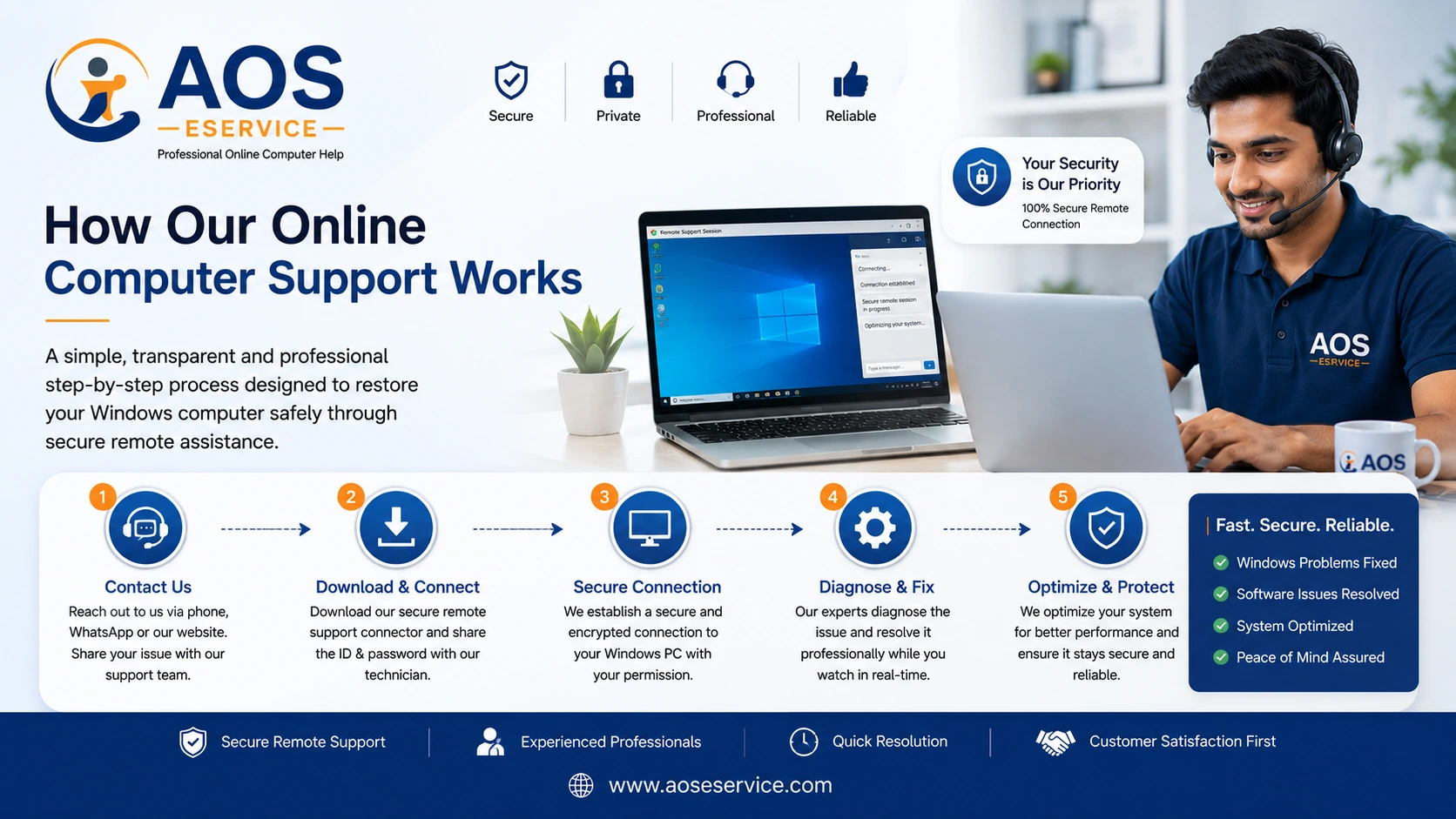
Professional Computer Support Made Simple
Many people are familiar with taking a computer to a local repair shop but have never experienced professional online computer support. As a result, they often wonder how the process works, whether it is secure and what actually happens once they request assistance. At AOS Computer Help, we believe that customers should understand every stage of the service before allowing anyone to work on their computer.
Our online support process has been designed to be straightforward, transparent and convenient. Rather than asking you to disconnect your computer, transport it to a service centre and wait several days for updates, we provide software-related assistance while your laptop or desktop computer remains safely with you. You can observe the entire troubleshooting session and communicate directly with the engineer whenever you have a question.
Every customer receives individual attention because every computer is different. Two systems may display similar symptoms while requiring completely different solutions. Instead of relying on assumptions, our engineers follow a structured workflow that begins with understanding the problem, continues with professional analysis and concludes only after the system has been checked carefully.
This page explains the complete journey of our online computer support service—from your first enquiry through to the successful completion of your remote support session. Whether you are seeking help for a slow Windows laptop, software errors, storage management or general system optimisation, understanding the process helps you know exactly what to expect.
Why We Follow a Structured Support Process
Successful computer troubleshooting rarely happens by chance. Professional technical support requires careful observation, systematic diagnosis and logical problem solving. Attempting random fixes without understanding the underlying cause often wastes valuable time and may even create additional complications.
For this reason, AOS Computer Help follows a well-defined support process for every customer. Each stage has a specific purpose, ensuring that important information is collected before any changes are made to your Windows system. This organised approach enables our engineers to work efficiently while keeping you informed throughout the service.
A structured process also improves communication. Customers know what will happen next, why certain questions are asked and how decisions are made during the troubleshooting session. Instead of feeling uncertain about the service, you remain involved from beginning to end.
Whether your computer requires a simple software adjustment or more detailed optimisation, following a consistent workflow helps us provide dependable technical assistance without unnecessary delays or confusion.
Step 1 – Tell Us About Your Computer Problem
Every successful support session begins with understanding the customer's concern. Before any appointment is scheduled or any remote connection is established, we encourage you to explain the problem you are experiencing as clearly as possible.
There is no need to use technical language or attempt to diagnose the issue yourself. Simply describe what you observe while using your computer. Even basic information often provides valuable clues that help our engineers prepare for the next stage of the support process.
Examples of issues customers commonly report include:
- Windows takes an unusually long time to start.
- The laptop becomes slow after several minutes of use.
- Applications freeze or stop responding.
- The computer frequently hangs during normal work.
- Storage space is running low.
- Windows displays unexpected error messages.
- Software fails to install correctly.
- The operating system behaves differently after a recent update.
- The computer has become noticeably slower over time.
- General performance no longer meets expectations.
Providing an accurate description of the symptoms allows our engineers to begin thinking about possible causes before the appointment even starts. It also reduces unnecessary troubleshooting later because we already understand the general nature of the issue.
If you know your Windows version, computer model or any recent changes that occurred before the problem appeared, sharing this information can further improve the efficiency of the support process.
Step 2 – Initial Review of Your Request
Once your enquiry reaches AOS Computer Help, our engineers carefully review the information you have provided. This initial assessment allows us to understand whether the reported issue is likely to be resolved through remote software support or whether additional clarification may be required before scheduling an appointment.
Unlike automated technical support systems that immediately begin following standard scripts, we treat every enquiry individually. Computers vary widely in age, hardware configuration, Windows version and installed software. Understanding these differences helps us recommend the most appropriate course of action.
During the review stage, we evaluate the information provided and determine whether further discussion is necessary. In many cases, we may contact you to ask a few additional questions that help us understand the behaviour of your system more accurately.
This preparation stage ensures that the time allocated for your appointment is used productively. Rather than collecting basic information after the session begins, our engineers arrive prepared to investigate the specific issue affecting your computer.
Step 3 – Personal Consultation and Understanding Your Requirements
Following the initial review, our support engineer may communicate with you to obtain a clearer understanding of your computer's condition. This consultation is an important part of our service process because it allows us to distinguish between temporary software issues, long-term performance problems and situations that may require a different technical approach.
During this discussion, you are encouraged to explain how you normally use your computer. Whether your Windows system is used for office work, online classes, graphic design, business management or everyday home computing, understanding your requirements helps us recommend solutions that are appropriate for your specific environment.
Our engineers may ask questions regarding:
- How long the problem has been occurring.
- Whether the issue appears every time or only occasionally.
- If Windows recently received major updates.
- Whether any new software has been installed.
- If antivirus software is currently active.
- Whether the computer has experienced unexpected shutdowns.
- How much free storage space is available.
- Whether the computer is used by multiple users.
This consultation is not an examination of your technical knowledge. Instead, it is an opportunity for our engineers to understand the practical circumstances surrounding your computer so that the support session can be planned effectively.
Open communication during this stage often reduces troubleshooting time significantly because potential causes can be identified before the remote session even begins.
Step 4 – Confirming the Most Suitable Appointment
Once we understand your requirements, we work with you to arrange a suitable appointment for the online support session. Rather than expecting customers to adjust entirely to our schedule, we try to identify a convenient time that suits both parties whenever possible.
Every appointment is allocated according to the estimated complexity of the reported issue. Simple software assistance generally requires less time than comprehensive Windows optimisation or advanced troubleshooting. By planning appointments appropriately, we ensure that each customer receives sufficient attention without unnecessary interruptions.
When confirming your appointment, we may provide guidance about preparing your computer beforehand. These simple recommendations help the session begin smoothly and reduce delays once the engineer connects remotely.
Examples of preparation may include ensuring that:
- Your laptop is connected to a reliable power source.
- A stable internet connection is available.
- Windows starts normally.
- Important documents have been saved.
- You remain available during the scheduled session.
Proper appointment planning benefits both customers and engineers. It allows technical work to proceed in an organised manner while ensuring that adequate time is available to investigate and resolve the reported issue.
Step 5 – Establishing a Secure Remote Support Session
At the agreed appointment time, our engineer will guide you through establishing a secure remote support session. The connection is created only after you grant permission, ensuring that you remain fully aware of when the session begins and ends.
The purpose of remote access is simply to allow the engineer to view and operate your Windows computer for the agreed software-related tasks. Throughout the session, you can watch every action taking place on your screen, observe cursor movements and communicate directly with the engineer whenever clarification is required.
Because each remote session requires your authorisation, you remain in complete control throughout the support process. The connection exists only for the current appointment and does not provide permanent access to your computer.
If you would like more detailed information about the technologies and safety measures involved, we recommend visiting our Remote Support page, where the complete connection process is explained in greater detail.
Step 6 – Comprehensive Computer Diagnosis
With the secure connection established, our engineer begins a structured examination of your Windows system. Rather than immediately attempting repairs, we first identify the underlying causes of the reported problem through careful analysis.
Computers often exhibit similar symptoms for entirely different reasons. A slow laptop, for example, may be affected by excessive startup programs, storage limitations, outdated software, unnecessary background processes or operating system configuration issues. Accurate diagnosis ensures that the correct solution is applied instead of relying on guesswork.
During this stage, our engineers may evaluate:
- Windows startup performance.
- System responsiveness.
- Storage utilisation.
- Installed applications.
- Background processes.
- Operating system configuration.
- Windows update status.
- General software health.
- Performance-related settings.
After completing the diagnosis, the engineer discusses the findings with you and explains the recommended course of action. This transparent approach ensures that you understand the condition of your computer before optimisation or troubleshooting begins.
Step 7 – Developing the Most Appropriate Solution
Once the diagnosis has been completed, our engineer develops a practical solution based on the actual condition of your Windows computer. This stage is one of the most important parts of our service because every computer requires an individual approach. Applying identical fixes to every system rarely produces the best results, which is why our recommendations are always based on the findings of the diagnosis rather than assumptions.
Some computers require only minor optimisation, while others benefit from more comprehensive maintenance. Instead of performing unnecessary procedures, we focus only on the software improvements that are genuinely needed to restore performance, improve stability or resolve the reported issue.
Depending on the diagnosis, the recommended solution may involve one or more of the following:
- Removing unnecessary startup applications.
- Cleaning temporary files and unnecessary system data.
- Optimising Windows performance settings.
- Organising storage and improving available disk space.
- Resolving software conflicts.
- Correcting Windows configuration issues.
- Installing or updating essential software components.
- Repairing operating system related issues.
- Removing applications that unnecessarily consume system resources.
- Providing recommendations for future maintenance.
Before significant changes are made, our engineer explains the recommended actions in clear language. We believe customers should understand what improvements are being made to their computers and why those changes are beneficial.
Step 8 – Professional Remote Service Begins
After discussing the proposed solution, the online service begins. Throughout the session, our engineer works carefully and methodically to carry out the agreed software maintenance tasks while ensuring that you remain informed about the progress being made.
Unlike automated optimisation software that performs generic actions without understanding your computer, professional remote support allows each adjustment to be made with consideration for your system's configuration and intended use. Every change is performed with the objective of improving performance, reliability and overall usability.
During the support session, you remain free to ask questions about the work being carried out. Many customers appreciate understanding how their Windows system functions, and our engineers are always happy to explain important procedures in straightforward language whenever appropriate.
The work performed during this stage varies according to your computer's individual requirements. Some systems require only routine optimisation, while others benefit from more detailed troubleshooting and software maintenance. Regardless of the complexity, every task is carried out with the same commitment to professionalism and attention to detail.
Step 9 – Testing and Verification
Completing technical work is only part of the support process. Before concluding the appointment, our engineers verify that the reported issue has been addressed successfully and that the computer is operating as expected.
Verification allows us to confirm that the improvements made during the session have produced the desired results. Rather than assuming success, we carefully examine the system after maintenance to ensure that Windows continues to function correctly.
Depending on the nature of the service provided, the verification process may include:
- Restarting Windows to confirm normal startup behaviour.
- Checking overall system responsiveness.
- Testing applications that were previously affected.
- Confirming successful completion of optimisation tasks.
- Reviewing available storage space.
- Ensuring Windows operates without unexpected errors.
- Confirming that the original issue has been resolved wherever possible.
This final testing stage provides confidence for both the customer and the engineer that the service has achieved its intended outcome. If any additional adjustments are required, they can often be addressed before the appointment concludes.
Every Computer Follows Its Own Path
Although we describe our support process as a series of organised steps, no two computers are identical. Different hardware configurations, Windows versions, installed software and user requirements mean that every support session develops differently.
Some customers contact us simply because their laptops have gradually become slower over time. Others require assistance after software installations, Windows updates or unexpected system behaviour. In many cases, a combination of several factors contributes to reduced performance rather than a single identifiable cause.
For this reason, our engineers adapt the service process to suit the condition of each individual computer instead of relying on fixed repair routines. This flexibility allows us to provide practical solutions that address the actual cause of the problem while avoiding unnecessary changes that may not benefit your system.
Professional online computer support is not about following a checklist—it is about understanding how your particular Windows computer behaves and applying the most appropriate technical solution based on careful analysis and experience.
Step 10 – Completion of Your Support Session
After all agreed maintenance and optimisation tasks have been completed, your remote support session reaches its final stage. Before disconnecting, our engineer reviews the work that has been performed and confirms that your Windows computer is functioning as expected. This final discussion gives you the opportunity to ask questions, understand the improvements made and receive practical advice for maintaining your computer in the future.
Rather than ending the appointment immediately after resolving the reported issue, we believe it is equally important to ensure that you feel confident using your computer after the service has been completed. If necessary, our engineer may demonstrate certain Windows features or explain simple maintenance practices that can help preserve system performance over time.
Whenever appropriate, recommendations may include keeping Windows updated, managing available storage space, uninstalling unnecessary applications and adopting sensible software installation practices. These preventative measures often reduce the likelihood of similar issues occurring in the future.
Why Our Step-by-Step Process Produces Better Results
Many computer users attempt to solve performance problems by following random internet tutorials or installing numerous "PC cleaning" applications that promise instant improvements. Unfortunately, these generic solutions often fail because they do not address the actual cause of the problem affecting an individual computer.
At AOS Computer Help, we follow a structured engineering approach rather than relying on guesswork. Every support session begins with understanding the customer's concerns, continues with systematic diagnosis and concludes only after the recommended solution has been implemented and verified. This organised workflow helps reduce unnecessary changes while improving the overall reliability of the service.
By following a consistent process, we are able to:
- Understand the customer's actual requirements before beginning work.
- Diagnose software-related issues logically.
- Avoid unnecessary troubleshooting steps.
- Recommend solutions based on evidence rather than assumptions.
- Maintain clear communication throughout the appointment.
- Provide transparent remote support.
- Verify the effectiveness of completed work before ending the session.
This professional methodology enables us to deliver dependable online computer support while ensuring that customers remain informed and involved at every stage.
What Makes Our Online Support Different?
Structured Diagnosis
Every computer is analysed individually before any optimisation work begins.
Transparent Communication
Customers understand what is happening throughout the entire support session.
Secure Remote Assistance
Remote connections are established only with your permission, and you remain in control at all times.
Tailored Solutions
Recommendations are based on your computer's actual condition rather than generic software fixes.
Professional Guidance
Our engineers explain important procedures and answer your technical questions clearly.
Customer-Focused Service
Our objective is not only to resolve software problems but also to help customers understand and maintain healthier Windows systems.
Frequently Asked Questions
Do I need technical knowledge before requesting support?
No. Simply describe the problem you are experiencing. Our engineers will guide you through every stage of the support process.
Can I watch the work while it is being performed?
Yes. Every action carried out during the remote session is visible on your computer screen, allowing you to observe the entire process.
Is every computer repaired using the same procedure?
No. Every Windows computer is different. Our engineers develop solutions based on the individual diagnosis of each system.
Can I ask questions during the appointment?
Absolutely. We encourage customers to ask questions whenever they would like clarification regarding the work being performed.
Can remote support repair hardware problems?
No. Remote assistance is intended for software-related issues. Physical hardware faults require inspection by an authorised service centre or qualified technician.
How long does the complete process usually take?
The duration depends entirely on the complexity of the reported issue. During the initial review, our engineer provides an estimated time based on your specific requirements.
Can I end the remote session whenever I choose?
Yes. Since the connection is established with your approval, you remain in control and may disconnect the session whenever necessary.
Will my personal files be accessed?
Our engineers focus only on software-related tasks required to complete the agreed service. Respecting customer privacy is a fundamental part of our professional standards.
Can older Windows computers still benefit from optimisation?
In many situations, yes. Although older hardware has performance limitations, appropriate software optimisation and system maintenance can often improve responsiveness and usability.
What should I do after reading this page?
If you believe your Windows laptop or desktop computer would benefit from professional online assistance, the next step is simply to contact AOS Computer Help. We will guide you through the consultation process, answer your questions and help you determine the most suitable course of action for your system.
Start Your Online Computer Support Journey Today
Understanding how professional remote computer support works is the first step towards resolving software-related problems with confidence. At AOS Computer Help, we have developed a structured, transparent and customer-friendly process that keeps you informed from your initial enquiry through to the successful completion of your support session.
Whether your Windows computer requires performance optimisation, software troubleshooting, operating system maintenance or general technical assistance, our experienced engineers are ready to help through secure remote support. Every appointment is planned carefully, every diagnosis is performed systematically and every solution is tailored to the actual condition of your computer.
If your laptop or desktop computer has become slow, unstable or difficult to use, we invite you to take the next step. Contact AOS Computer Help today and experience professional online computer support delivered with transparency, technical expertise and a genuine commitment to helping you get the best from your Windows computer.